ecu.test Release 2026.2

Highlights at a glance

ecu.test agent

End-to-end workflow from specification to test case generation to trace analysis


With the current release, the ecu.test agent completes the end-to-end, AI-powered creation of test cases. Based on a test case and trace analysis specification, the ecu.test agent  now seamlessly handles all implementation steps – from test case generation and recording to trace analysis.
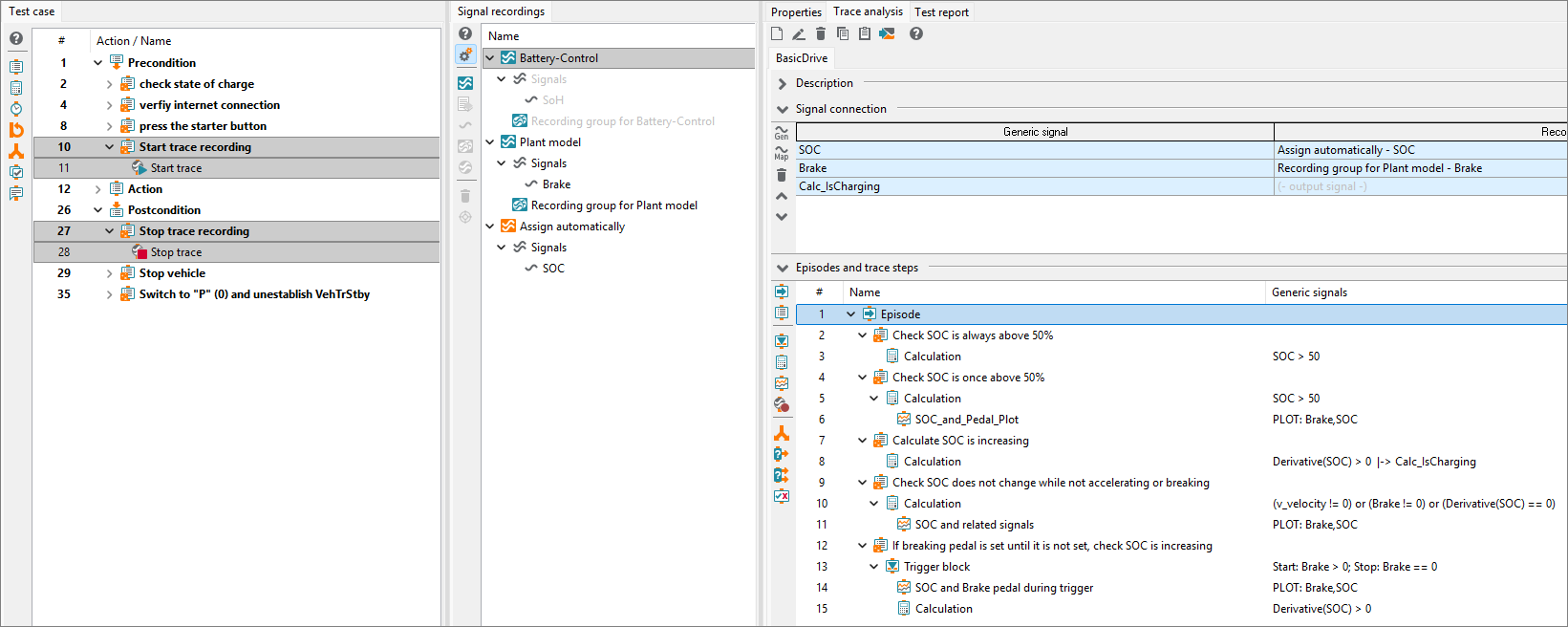
ecu.test agent - End-to-end workflow from test case to trace analysis

Tasks that previously required manual effort can now be fully handled by the ecu.test agent. Trace recording is supported by the test steps Start/Stop trace recording. When generating signals, the ecu.test agent relies on proven mechanisms for automatic signal group assignment.

The functionality for generating recordings and signals, which was not available in previous versions, is now an integral part of this end-to-end solution, enabling users to automatically generate the entire implementation based on a test case and trace analysis specification.
Agentic multimedia test steps


With the TouchInput test step, ecu.test already offers the option of performing various actions (clicking, swiping, rotating, etc.) to interact with an HMI or a website. Until now, however, fixed coordinates had to be specified. With the Image-Read test step, expectations can be set for the content of images – however, these must match the reference 100%.
This approach is not particularly robust, especially when testing HMI elements. If the positions and sizes of the elements change during development, manually created test cases must be laboriously adjusted.

The new AI function in the TouchInput test steps allows prompts to be used instead of coordinates. For testing an HMI, for example, the following prompts are conceivable:
  • Press the "Radio" button.
  • I want to make a phone call.
  • I want to listen to music.
With the new image-reading feature, complex expectations can be set. Reference images can also be provided to the model:
  • A blue Wi-Fi icon is visible in the upper-right corner.
  • The reference image appears twice.
  • The language in the image is Chinese.
Video: HMI Testing in ecu.test
The model analyzes the image and returns the coordinates regardless of the language setting, element arrangement, or displayed content. This enables the creation of robust test steps.

The model is connected via the ecu.test agent  connector and can be custom-ized to individual needs. We have had positive experiences with both Claude 4.6 and ChatGPT.

Selective tool restart when test bench parameters are changed

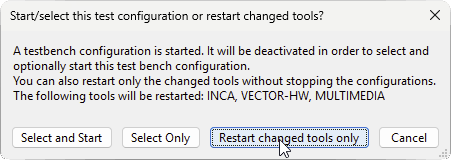
Depending on the tools used and the size of the databases to be loaded, starting an ecu.test configuration may take some time. Previously, as soon as a setting in an already started test bench configuration was changed, the entire configuration had to be restarted.

Starting with this version, when saving a test bench configuration, you will be asked whether only the changed tools should be restarted. This may be necessary, especially when setting up or modifying a test bench, and can lead to significant time savings.
ecu.test Release 2026.2, Selective tool restart when test bench parameters are changed

Starting the configuration in offline mode

We improve test case creation in large teams by enabling ecu.test to utilize valuable testing resources as efficiently as possible. This allows more time to be spent on running tests and developing new ones in parallel.

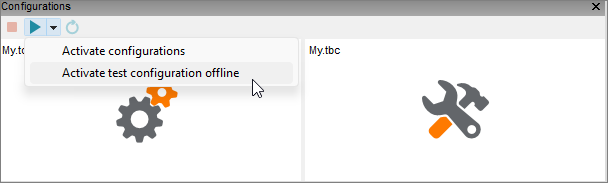
To execute a test case, the configuration must be started. Previously, this process blocked the underlying resource (e.g., the HiL). Other users, as well as the ResourceAdapter from test.guide, were unable to interact with the HiL during this time, for example, to run tests.

With the new offline mode the configuration can now be started without blocking the test resource.
ecu.test Release 2026.2, Selektiver Tool-Neustart bei geänderter Testbench-Parametrierung

Note: Some functions are not available in offline mode or are only available with restrictions. For example, no online requests are made. All restrictions can be found in the help section.

You can find information about all new features, extensions, and improvements in this release in our Release Notes and in the Changelog.