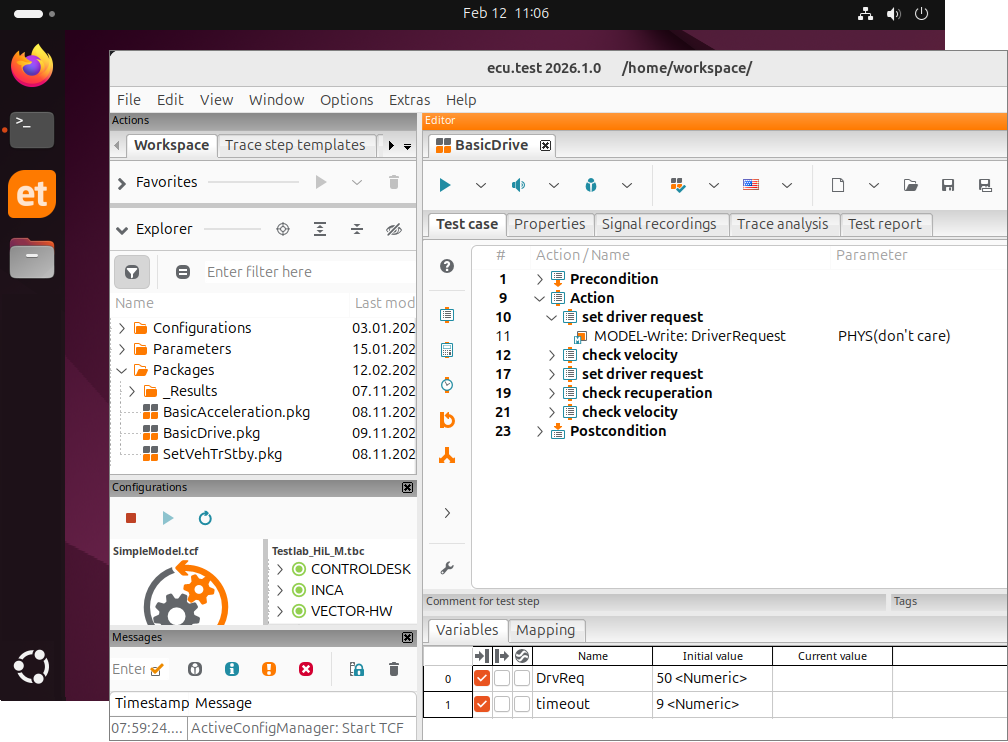
ecu.test is now available for Linux with a full graphical user interface, in addition to Windows. This allows users to create, execute, and evaluate tests directly in their Linux environment, without switching to Windows to make additional adjustments to tests and configurations.
The ecu.test Linux GUI is available for Ubuntu 24.04 and, together with the ecu.test Linux Runner, simplifies development and validation while enabling more efficient use of existing Linux infrastructure.
ecu.test Release 2026.1
Highlights at a glance
ecu.test Linux GUI
CAN-FD Timing Helper
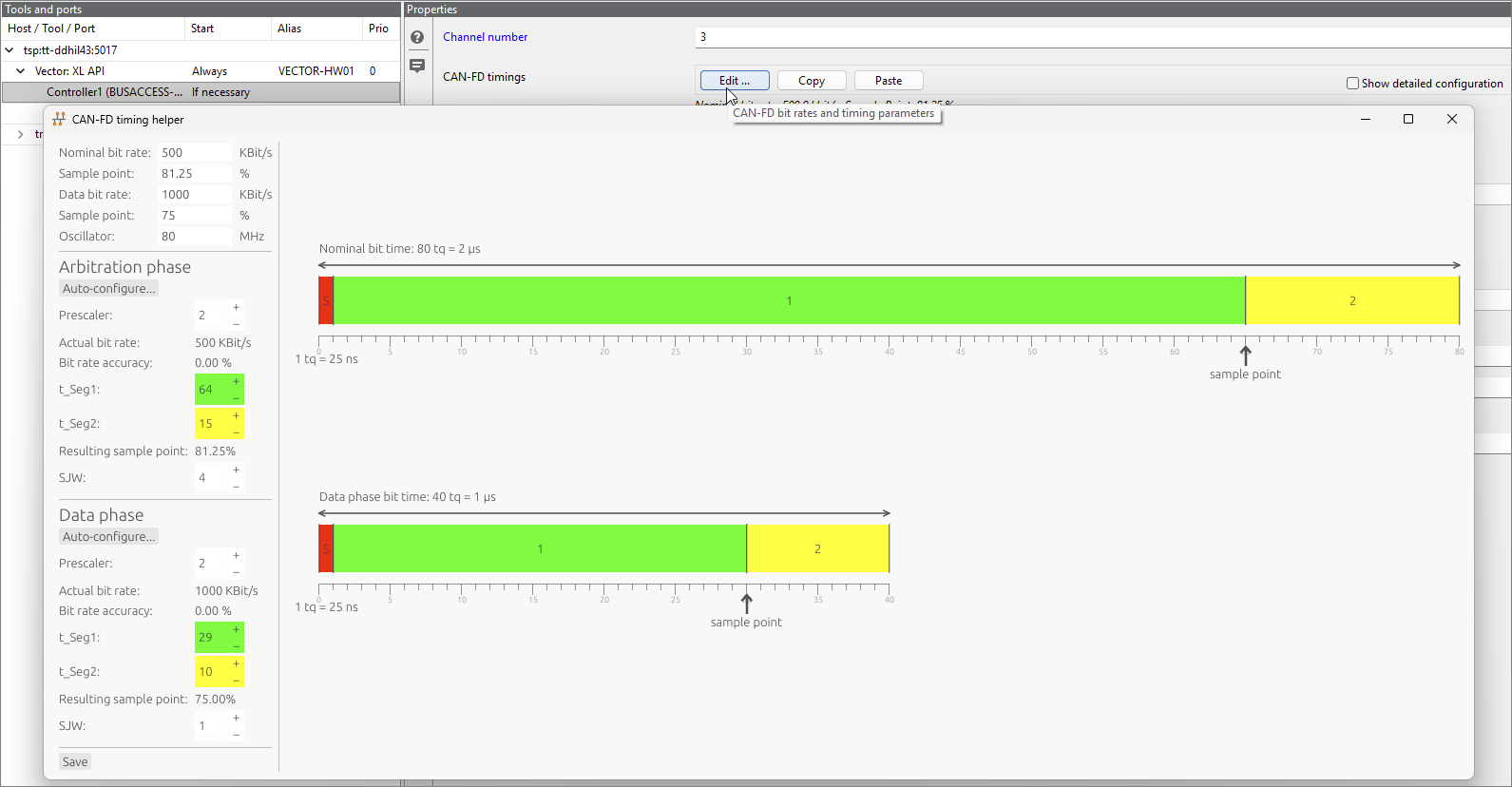
The new CAN-FD Timing Helper utility simplifies test bench configuration for CAN-FD-capable bus hardware.
Based on the parameterisation of bit rates, sample points and oscillator frequency, the missing parameters – synchronisation jump and time segments – are automatically determined and visualized.
Although manual parameterisation in the test bench configuration with deviating values is still possible, it is no longer mandatory. In addition, once values have been determined, they can be copied as a whole at the touch of a button and pasted onto other ports.
Based on the parameterisation of bit rates, sample points and oscillator frequency, the missing parameters – synchronisation jump and time segments – are automatically determined and visualized.
Although manual parameterisation in the test bench configuration with deviating values is still possible, it is no longer mandatory. In addition, once values have been determined, they can be copied as a whole at the touch of a button and pasted onto other ports.
Parallel tool start
Operating the test infrastructure involves high costs. The time spent configuring the test bench and its tools must be subtracted from the valuable test time and, although the configuration start is necessary, does not contribute to the actual tests.
Especially with extensive test bench configurations (TBC) involving many tools, the start of the configuration can be time-consuming. The start-up time of a tool depends heavily on the configuration steps required, the scope of the configuration, and the individual implementation of the tool and its API.
Previously, all tools in a TBC were started sequentially. With ecu.test 2026.1, the tools are now started in parallel, which results in substantial time savings. The individual start-up priority set by the user for each tool is still taken into account.
Especially with extensive test bench configurations (TBC) involving many tools, the start of the configuration can be time-consuming. The start-up time of a tool depends heavily on the configuration steps required, the scope of the configuration, and the individual implementation of the tool and its API.
Previously, all tools in a TBC were started sequentially. With ecu.test 2026.1, the tools are now started in parallel, which results in substantial time savings. The individual start-up priority set by the user for each tool is still taken into account.
Package execution for ecu.test code
For certain tasks, helper packages might already exist, or expressing a subtask as a package might be more concise.
From now on, ecu.test code can call packages that respect certain limitations. Parameters can be passed in, return values can be passed out, and the evaluation of the package execution (SUCCESS, FAILED, etc.) can be queried. Of course, package calls can also be used in conjunction with access to test signals.
From now on, ecu.test code can call packages that respect certain limitations. Parameters can be passed in, return values can be passed out, and the evaluation of the package execution (SUCCESS, FAILED, etc.) can be queried. Of course, package calls can also be used in conjunction with access to test signals.

CheckResponse simplifies time checks in trace analyses
Previously, it was difficult to model typical temporal relationships between two signals in trace analysis without using trace step templates.
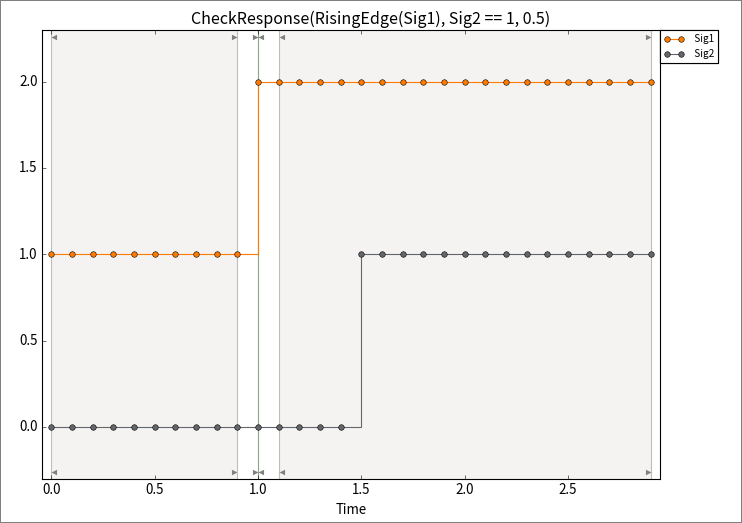
The CheckResponse function is now available for calculation steps and trigger blocks. It significantly simplifies temporal checking by requiring only two signals and a timeout parameter. If the value of the first signal is true at a given point in time, CheckResponse checks that the second signal also becomes true within the timeout period.
It is good practice to specify an edge function for the first signal, as the state change of a signal usually serves as the activation condition:
The optional useHoldValue parameter can be used to address special cases where the second signal is rarely sampled and may have already been in the desired state before the activation time.
The CheckResponse function is now available for calculation steps and trigger blocks. It significantly simplifies temporal checking by requiring only two signals and a timeout parameter. If the value of the first signal is true at a given point in time, CheckResponse checks that the second signal also becomes true within the timeout period.
It is good practice to specify an edge function for the first signal, as the state change of a signal usually serves as the activation condition:
- CheckResponse(RisingEdge(Sig1), Sig2 == 1, 0.5)
The optional useHoldValue parameter can be used to address special cases where the second signal is rarely sampled and may have already been in the desired state before the activation time.